Building a Salesforce Slack Assistant: Lessons in AI-Powered Enterprise Tools
Introduction
When we set out to build a Salesforce assistant for Slack, we knew we were venturing into relatively uncharted territory. The idea seemed simple: allow our sales team to query Salesforce data directly from Slack. But as with most seemingly simple ideas in software, the devil was in the details.
The Genesis
Our sales team was spending too much time switching between Slack and Salesforce. This context-switching was more than just an annoyance; it was a real drag on productivity. We thought, “What if we could bring Salesforce to where our team already spends most of their day?”
Architectural Decisions
The Stack
We settled on a Python backend, leveraging the OpenAI API for natural language processing, and the Salesforce API for data retrieval. Here’s why:
- Python: Fast development, rich ecosystem for both AI and Salesforce integrations.
- OpenAI API: State-of-the-art language models for understanding complex queries.
- Salesforce API: Robust and well-documented, essential for reliable data retrieval.
The Flow
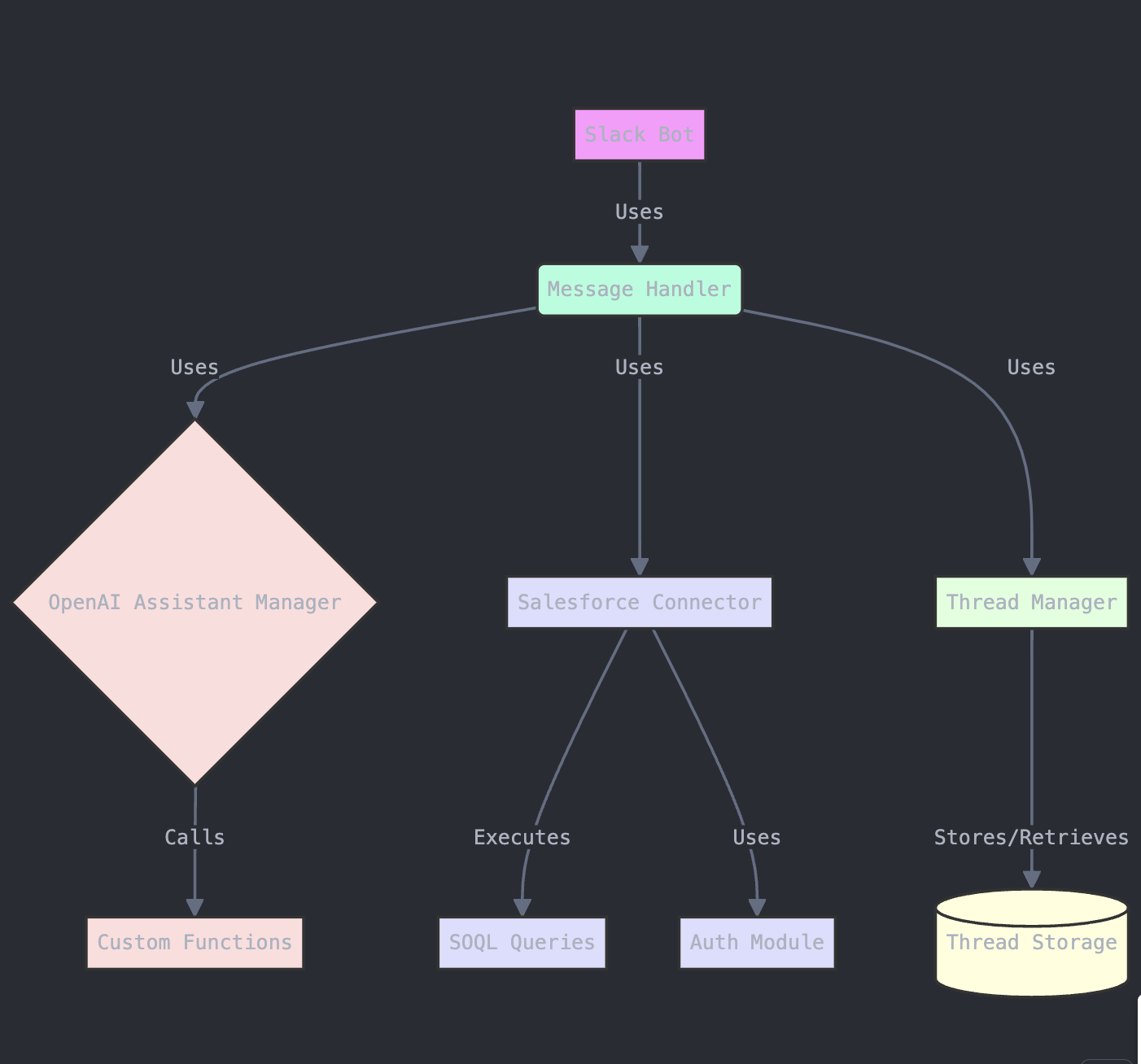
The basic flow of our assistant works like this:
- User sends a message in Slack.
- Our server processes the message.
- OpenAI Assistant interprets the query.
- If needed, we fetch data from Salesforce.
- We generate and send a response back to Slack.
Sounds simple, right? But each of these steps hides layers of complexity.
Challenges and Solutions
1. Context Management
One of the first hurdles we hit was maintaining context across messages. We needed our assistant to remember previous queries within a conversation.
Solution: We implemented a thread management system using Python’s shelve module. Each Slack thread gets a corresponding entry in our database, allowing us to maintain context efficiently.
2. Query Translation
Turning natural language into SOQL (Salesforce Object Query Language) queries was our next big challenge.
Solution: We leveraged OpenAI’s function calling capabilities. We defined custom functions that the AI could “call”, effectively translating natural language into structured queries.
3. Data Visualization
Raw data is rarely what users want. Often, they need charts or graphs to make sense of the numbers.
Solution: We integrated a chart generation service. When the AI detects that a visual representation would be beneficial, it triggers this service to create and send images directly in Slack.
The Architecture in Detail
The system follows a modular architecture: Slack receives user messages and forwards them to our Python backend, which orchestrates between the OpenAI API (for natural language understanding) and the Salesforce API (for data retrieval). Responses flow back through the same pipeline, with a caching layer to minimize redundant API calls.
Performance Considerations
As with any system that interfaces with multiple external APIs, performance was a key concern. We implemented several optimizations:
- Caching frequently requested data.
- Asynchronous processing for long-running queries.
- Intelligent query optimization to minimize Salesforce API calls.
We track response latency, cache hit rates, and API call volume in real time — this lets us quickly spot bottlenecks and tune the system before users notice degradation.
User Experience
We paid special attention to the user experience, aiming to make interactions with our assistant as natural as possible. A typical interaction starts with a natural-language question in Slack, which the assistant interprets, queries Salesforce, and returns a formatted response — all within the same thread so context is never lost.
Evolution and Future Plans
Our Salesforce Slack Assistant wasn’t built in a day. It evolved over time, and continues to evolve. We started with simple text queries, added chart generation, then context-aware threading, and most recently, proactive notifications. Future plans include enhanced AI capabilities and multi-platform support.
Lessons Learned
-
Start simple, but design for complexity: Our initial MVP was basic, but we architected it in a way that allowed us to add features without major rewrites.
-
User feedback is gold: Some of our most useful features came directly from user suggestions.
-
AI is powerful, but needs guardrails: We learned to carefully define the boundaries of what our AI assistant can do to prevent unexpected behavior.
-
Performance matters more than you think: In a chat interface, even small delays can significantly impact user experience.
Conclusion
Building this Salesforce Slack Assistant has been a journey of continuous learning and improvement. It’s a testament to the power of bringing AI into enterprise tools, but also a reminder of the challenges that come with it.
As we continue to refine and expand our assistant, we’re excited about the potential impact on not just our sales team, but on how enterprises interact with their data as a whole.
Remember, the goal isn’t just to build cool tech—it’s to solve real problems for real users. Keep that in mind, and the rest will follow.